

Your booking page
This page helps you understand your booking page and what visitors see when they book.
Each business has a booking page.
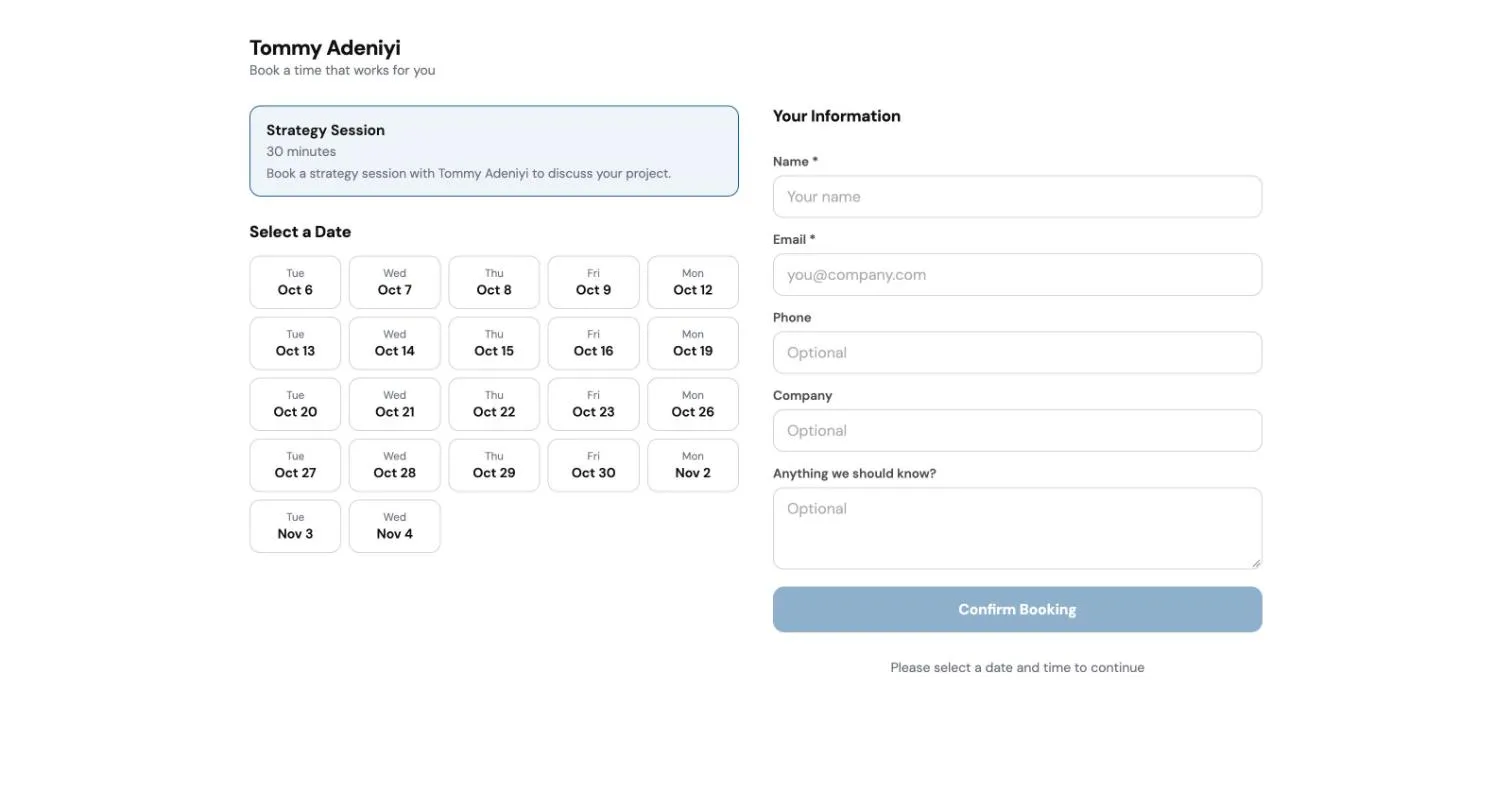
How a visitor books
Section titled “How a visitor books”- They choose the kind of meeting, for example a strategy session.
- They pick a date and a time when you are free.
- They fill in their name and email, and anything else they want to add.
- They choose Confirm Booking.
They then get a Google Calendar invite with a Google Meet link, and the meeting appears in your calendar.
Change your meeting types
Section titled “Change your meeting types”If your website runs on webfaCePress, you change your meeting types in your website editor.
- Open your website editor at
yoursite/admin. - Open Booking, then Meeting types.
- Choose a meeting type, or add a new one.
- Change what you need, then choose Publish.
For each meeting type you can set:
- the name and a short description;
- how long the meeting is;
- how many days ahead people can book, and a gap between meetings;
- the days and hours you are available;
- where it happens, for example Google Meet, a phone call or in person;
- the message people see after they book;
- whether it is open for booking. Switch Active off to stop people booking it without deleting it.
Your booking page picks up the change shortly after you publish.
If you do not have a webfaCePress website, contact support@webfacemedia.com to change your meeting types.