

Approving scripts and videos
This page helps you approve, change or reject the scripts and videos webfaCe Channels prepares.
Every video waits for two approvals from an Agent admin:
- The script, before anything is spent.
- The finished video, which you watch before it goes to YouTube.
Where videos wait
Section titled “Where videos wait”The Channels page groups your videos:
| Group | What it holds |
|---|---|
| Needs your approval | Scripts to read and finished videos to watch. |
| Being made | Writing, voicing, pictures and rendering. |
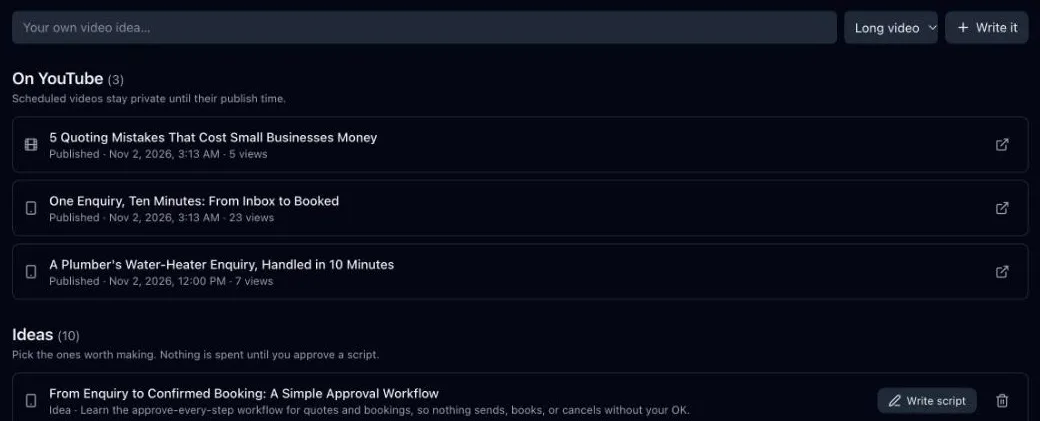
| On YouTube | Scheduled and published videos. Scheduled videos stay private until their publish time. |
| Needs attention | Something stopped. Choose Try again, or delete it. |
| Ideas | Topics to choose from. Nothing is spent until you approve a script. |
Get ideas
Section titled “Get ideas”- Under What this channel sells, choose Get 12 video ideas beside the product. It shows Getting ideas… until they arrive, also if you reload the page.
- Or type a topic, choose Long video or Short, pick the product and choose Write it.
Approve the script
Section titled “Approve the script”Open a video with Script ready and read it. Then:
- Approve script and make the video starts the video.
- Edit opens the script for changes. It is shown in a structured format (JSON): change only the wording, not the field names. If you reload before saving, your changes come back.
- Write a new version writes the script again.
- Reject stops the video.
Approve the video
Section titled “Approve the video”When the video shows Ready to watch, watch it to the end. Then:
- Approve and schedule on YouTube uploads it as private. It goes public at the next publishing slot. If YouTube’s daily upload limit is reached, it waits and uploads after the reset. See Publishing and stats.
- Reject stops it. Nothing goes to YouTube.
Once a video is on YouTube, the link beside it opens it in YouTube Studio.